
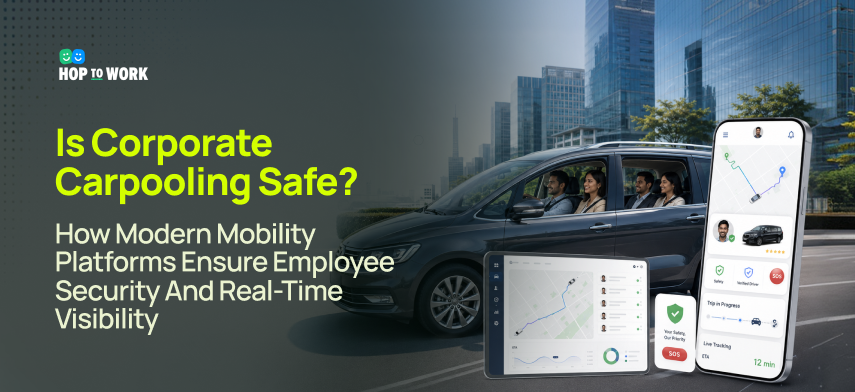
The question organisations ask when evaluating corporate carpooling safety is rarely 'does it save money?' They know it does. The question is almost always, 'Is it safe enough?' And that question, when examined carefully, splits into two. The first is about the real risk level of corporate carpooling relative to the alternatives: individual taxis, personal car commutes, or company-owned vehicles. The second is about the accountability architecture of the programme: what safeguards are in place, who can see what in real time, and what happens when something goes wrong. This guide addresses both questions directly, with the technology detail that HR directors, safety officers, and mobility managers need to evaluate corporate carpooling safety against their organisation's duty of care obligations.
Understanding the Safety Question: What HR and Safety Teams Are Really Asking
When an organisation evaluates corporate carpooling safety, the question is not abstract. It is specific: if an employee is in a shared vehicle at 8 pm, travelling home from the office, and something goes wrong, what can the organisation see, do, and be held accountable for? Whether the incident involves a dangerous driver, a route deviation, a medical emergency, or an interpersonal situation with another passenger, the accountability chain must be clear before the programme launches.
The Real Risk Profile of Corporate Carpooling
To evaluate whether corporate carpooling is safe, HR and safety teams need a realistic baseline for what the risks actually are, relative to the alternatives their employees use today. The table below compares transport modes across the dimensions that matter for duty of care.
| Transport Mode | Employer Visibility | Employee Control | Duty of Care | Incident Risk |
|---|---|---|---|---|
| Personal vehicle commute | None | Full | Minimal | Industry baseline |
| Rideshare (consumer app) | None unless platform-integrated | Limited | Moderate | Comparable to personal vehicle; interpersonal incidents higher |
| Corporate carpooling (informal) | None or minimal | Moderate | High employer risk | Comparable to personal vehicle |
| Corporate carpooling (platform-managed) | Full: GPS, SOS, route visibility, incident log | High | Full duty of care coverage | Lower interpersonal incident rate; anomaly detection active |
| Company coach/bus | Full: vehicle tracking, driver certification | Low | Full duty of care coverage | Very low road incident rate |
The Duty of Care Legal Framework
Duty of care obligations for employer-organised transportation vary by jurisdiction but share a common structure: when an employer organises or directs an employee's travel, the employer takes on a reasonable care obligation toward that employee during the journey. In the UK, the Health and Safety at Work Act 1974 and the Management of Health and Safety at Work Regulations 1999 establish that employers must, so far as is reasonably practicable, ensure the health, safety, and welfare of employees during work-related travel. The Corporate Manslaughter and Corporate Homicide Act 2007 creates criminal liability for gross failures of duty. For corporate transportation solutions, this means driver vetting, vehicle safety standards, incident reporting, and demonstrable oversight.
In India, the Motor Vehicles Act 1988 and state-specific employee transportation management safety notifications require GPS tracking on corporate vehicles, emergency communication capability, trained drivers with verifiable credentials, and, in many states, mandatory route registration with transport authorities. The Protection of Women from Sexual Harassment (POSH) Act 2013 creates specific obligations for women's safety in workplace-organised transport.
In the USA, OSHA's General Duty Clause requires employers to provide a workplace free from recognised hazards, and court precedents have extended this to employer-organised commute transport. State-level legislation varies; California, New York, and Illinois have specific employer transportation provisions.
The EU Framework Directive 89/391/EEC requires employers to take appropriate protective and preventive measures for all employee activities, and this has been interpreted to include employer-organised transport in multiple member state implementations.
In Singapore and Malaysia, Workplace Safety and Health Acts in both jurisdictions require employers to ensure the safety of employees, with transport explicitly included where the employer has organised it. Both jurisdictions have specific requirements around night shift transport for female employees.
Driver Verification and Vetting: The Foundation of Corporate Carpooling Safety
Driver verification is the first and most important safety layer in any corporate carpooling safety architecture. Whether the drivers are employed by a transport company or are employees driving colleagues in their own vehicles, the verification process must establish that the person behind the wheel is who they claim to be, has the legal right to drive, and has been screened for prior incidents. A strong corporate commute management solution builds this verification into the onboarding flow itself, making it non-negotiable before a driver receives their first assignment.
The Driver Verification Stack
| Verification Layer | What It Checks | Technology | Cadence |
|---|---|---|---|
| Identity |
|
|
|
| Driving licence |
|
|
|
| Criminal background |
|
|
|
| Vehicle and insurance |
|
|
|
| Daily pre-trip check |
|
|
|
Employee-as-Driver Verification (Peer-to-Peer Corporate Carpooling)
Many corporate carpooling programmes involve employees driving colleagues in their own vehicles. This peer-to-peer model reduces cost significantly but requires a verification framework that addresses the specific risks of non-professional drivers.
Vehicle inspection is the starting point. The employee’s vehicle must meet minimum safety standards: a current roadworthiness certificate, tyres within legal limits, functional seatbelts for all passenger positions, and no outstanding manufacturer recalls affecting safety systems. A platform-facilitated self-inspection checklist, combined with a periodic independent inspection for high-frequency drivers, provides reasonable assurance.
Appropriate insurance is a related requirement. Standard personal motor insurance in most jurisdictions does not cover carrying passengers for a business purpose. Employees who regularly drive colleagues may require a specific business use endorsement. The corporate mobility platform should make insurance status a condition of driver registration and require regular confirmation of continued appropriate coverage.
Driving history disclosure is the third layer. Unlike taxi drivers who face professional licensing, employee drivers in peer-to-peer programmes disclose their driving history through the background check process. Any licence endorsement for dangerous driving, drink driving, or other serious offences should be a registration disqualifier. Speeding endorsements above a threshold, for example, more than two in the past three years, should require HR review.
Fatigue and hours management are equally important. Employees who drive to work, carry colleagues home, and work a full day face accumulating fatigue risk. The corporate mobility platform should enforce maximum driving hours per week within the programme, flag drivers who have taken on more carpooling trips than a configured threshold, and prompt safe driving acknowledgements before trips that start after 10 pm or before 6 am.
Real-Time GPS Tracking and Route Visibility: What Safety Teams Can See
Real-time GPS tracking is the capability that most directly addresses the accountability question: what can the organisation see during a journey? This is where real-time ride tracking becomes a genuine safety tool rather than a feature checkbox. The answer depends on how the tracking system is designed, what data it provides to whom, and how exceptions are surfaced to safety teams rather than buried in a data stream no one actively monitors.
What Real-Time Tracking Must Provide
Live vehicle position gives the safety team the exact vehicle location at any moment. GPS position updates every 30 to 60 seconds while the trip is active, displayed on a map in the safety dashboard and passenger app. Position updates must continue when the driver's phone is locked. Position is shared only for active trips, is not stored indefinitely, and both driver and passenger are notified that tracking is active.
Route progress monitoring allows the system to detect if the vehicle is following the expected route. The route is encoded at trip start, and the real-time position is compared against a defined route corridor. A significant deviation from that corridor triggers an alert. The deviation alert is an objective measurement, not surveillance of every small variation.
ETA visibility allows the safety team and the employee's designated contact to see when the vehicle is expected to arrive. Real-time ETA is calculated from the current position, remaining route, and live traffic. Late arrivals are automatically flagged. This is part of what makes a well-built employee commute safety system genuinely useful: it surfaces exceptions without requiring a safety officer to watch every trip manually.
Trip completion confirmation lets the safety team know when the employee has been dropped off safely. The trip is marked complete when the driver taps Complete in the driver app, with the GPS position at completion confirmed against the destination address. An automatic notification reaches the designated contact if they have opted in.
Historical trip replay means that in the event of an incident, the safety team can replay the exact route taken. GPS tracks are stored for each trip for a configurable retention period, typically 90 days. Trip replay is available to authorised safety team users, and an audit log records who accessed which replay.
Route Deviation Detection and Alerting
Route deviation detection is the real-time ride tracking feature that most directly addresses the concern about a vehicle taking an unexpected route. Effective detection requires careful calibration to avoid both false positives, alerts for minor legitimate detours, and false negatives, where a significant deviation is missed because the threshold is too wide.
The detection logic works as follows. At trip start, the planned route is encoded as a sequence of GPS waypoints with a configurable corridor width, defaulting to 600 metres on each side of the route. During the trip, the vehicle position is checked against the corridor every 60 seconds. If the position is outside the corridor for three consecutive checks, which is three minutes, and the deviation distance exceeds the configurable threshold, typically 800 metres, a deviation event is triggered.
Before alerting, the system checks for known legitimate deviation reasons. If there is a traffic incident or road closure on the planned route, confirmed via live traffic API, no alert is sent, and the deviation is logged as traffic-related. If no known incident exists, the deviation alert is triggered.
Deviation alerts escalate in three levels.
- At Level 1, the driver is automatically notified and prompted to confirm whether they are on a detour and provide a reason. If the driver responds with a legitimate reason, the alert is dismissed, and the reason is logged. If there is no response within two minutes, the alert escalates to Level 2.
- At Level 2, the safety team dashboard receives an alert, and a push notification goes to the safety officer, who can call the driver or passenger directly from the dashboard. If the driver does not respond for an additional three minutes, or if the passenger presses SOS, the event escalates to Level 3.
- At Level 3, the emergency services option is presented to the safety officer, the passenger's designated emergency contact is automatically notified, and all GPS data is preserved and flagged for investigation.
Calibration is essential for keeping the false positive rate below 2%. The corridor width widens during times when detours are more common. Route learning means that if the same driver takes the same legitimate deviation more than three times, the system learns it as an acceptable alternate route for that origin-destination pair. Drivers can also proactively notify a route change reason before the alert threshold is reached.
SOS and Emergency Response: What Happens When an Employee Needs Help
The SOS feature is the highest-stakes capability in a corporate mobility platform. It must be instantly accessible, reliably functional even with poor connectivity, and connected to a response chain that can actually help. The engineering details of how SOS is implemented determine whether it is a genuine safety capability or a checkbox on a vendor's feature list. Any credible employee transportation software must treat SOS architecture as a core deliverable, not an optional add-on.
SOS Architecture Requirements
One-tap activation is the baseline requirement. The SOS button must be accessible without unlocking the phone or navigating menus. A persistent large button on the main trip screen, with an optional volume or power button shortcut for locked screen activation, covers both accessible and under-pressure scenarios. A confirmation prompt with a three-second countdown prevents accidental triggers.
Offline and low-connectivity SOS is equally critical for any safe employee commute solution. Urban car parks and tunnels have no signal. An SOS that fails in a poor signal is not a safety feature. The correct implementation stores the SOS event locally if there is no connectivity and transmits it as soon as any signal is available, with an SMS fallback that requires minimal bandwidth.
Multi-channel notification ensures that when SOS is triggered, multiple parties are notified simultaneously within eight seconds. A single-channel notification fails if the safety team member is not watching their dashboard. Multi-channel delivery includes a push notification to the safety team dashboard, SMS to pre-configured emergency contacts, WhatsApp message to the corporate safety number, and an email to the safety team with GPS location embedded.
Live GPS location in the SOS alert is non-negotiable. Emergency respondents need the current location, not the starting location. The GPS position at the moment of SOS trigger is included in all notifications, and the position continues updating every 15 seconds after the SOS triggers.
Silent SOS mode is a critical capability that is frequently underbuilt. An SOS that audibly alerts the driver or makes the phone light up can escalate a threatening situation. Silent mode, typically activated by holding the volume-down button for three seconds, sends all notifications without any sound or screen change on the passenger's phone.
Two-way communication from the safety dashboard means the safety team can communicate with the passenger or driver from the same screen where they see the alert. Masked number calling protects the safety team's number when the driver is the concern, and full communication is logged in the platform.
SOS dismissal by the passenger only is an important safeguard. Automatic SOS events triggered by AI anomaly or check-in failure can be dismissed only by the passenger confirming their safety via a confirmation code in the app. The safety team cannot dismiss a passenger's SOS without the passenger's own confirmation.
Automatic SOS Triggers: AI Safety Monitoring
Modern corporate mobility solutions do not rely only on employees pressing the SOS button. Automatic triggers detect safety anomalies and initiate alerts before the employee may be able or willing to manually trigger them.
Silence detection with check-in failure addresses passengers on late-night routes who have not interacted with their phone for more than a configurable period, typically 20 to 30 minutes. The platform sends a safe check-in notification. If it is not acknowledged within three minutes, an automatic alert is triggered to the safety team. This is particularly relevant for employees who fall asleep in the vehicle and may not notice unexpected route changes.
Sudden stop detection identifies when the vehicle stops abruptly in a location that is not the destination, detected from the GPS sudden deceleration pattern. If the stop persists for more than a configurable time, typically five minutes, an automatic alert is triggered. The alert is dismissed if the driver confirms a legitimate stop reason.
Extended journey time anomaly detection triggers a check-in request to the passenger if the trip is taking significantly longer than the estimated journey time, for example, 50% longer, with no traffic explanation. Non-response triggers a safety team alert.
Post-trip non-completion detection catches the scenario where a driver marks a trip complete, but the GPS position is not at or near the destination address. A discrepancy alert is raised for safety team review.
Special Safety Protocols for Women and Night Travel
Corporate carpooling programmes face heightened scrutiny around two specific populations: women employees travelling alone or in mixed groups, and employees travelling on late-night routes. Both groups have safety protocol requirements that go beyond the general measures applied to all journeys. This is where employee transportation solutions must go further than standard features, particularly for organisations operating in markets with explicit regulatory requirements for women's safety in workplace transport.
Women's Safety Features in Corporate Mobility Platforms
| Safety Feature | What It Does | Technical Implementation | Regulatory Driver |
|---|---|---|---|
| Women-only option | Matches women employees with women drivers and passengers only | Gender preference in profile; algorithm filters to women-driver vehicles; separate pool where volume allows | POSH Act (India); employee comfort; adoption improvement |
| Guardian (live location sharing) | Employee shares live journey with personal contact outside the corporate system | Shareable tracking link via trip_id and one-time token; browser-based for recipient; updates every 60s; expires on completion | Employee agency; reduces reliance on corporate safety team |
| Driver behaviour dashboard | Passenger rates driver conduct after each trip; safety scores reviewed by safety team | Post-trip safety ratings separate from service ratings; 1-star safety rating triggers immediate review; patterns analysed | Feedback for discomfort below SOS threshold; driver accountability |
| Night route safety window | 8 pm–6 am routes with women employees: shorter check-in intervals, mandatory completion confirmation, supervisor notification | Time-of-day trigger activates enhanced safety mode; configurable by policy; supervisor notified at trip start | State transport notifications (India), UK, and Singapore best practice; POSH Act |
| Emergency contact auto-notification | Designated contact notified at trip start with driver details and tracking link; notified again at completion | Opt-in in profile; automated SMS at start and completion; if completion not received within 15 min of ETA, check-in SMS sent | Passive safety net; reduces cognitive burden on the employee |
Night Shift and Late-Night Transport Protocols
Night shift transport presents the highest safety risk in any employee carpooling programme. The combination of reduced bystander presence, fatigue in both driver and passenger, and low ambient light requires specific protocol enhancements beyond the standard feature set.
A designated night safety officer is the most important operational requirement. Organisations with significant night transport should assign a person with safety dashboard access who actively monitors during the high-risk window, typically 10 pm to 3 am. The platform must support role-based alert routing so all night route alerts reach this designated role first, with secondary escalation to an on-call safety manager.
Reduced check-in intervals are the second requirement. On night routes, the automatic check-in interval should be 15 minutes rather than the 30-minute standard for daytime routes. This reduces the window between a safety anomaly occurring and its detection.
Mandatory drop-off confirmation means the platform requires both driver confirmation, the trip marked complete with GPS at the destination, and passenger confirmation of safe arrival before the trip record is closed. Non-confirmation triggers an automatic check-in message to the passenger.
Driver fatigue management is the fourth element. For drivers active on the platform for more than a configurable number of hours, typically six hours of active driving in a day, the platform should prompt a rest confirmation before accepting additional night trip assignments.
The Corporate Safety Dashboard: What Safety Officers See and Can Do
The corporate safety dashboard is the command centre for employee transportation management oversight. It translates real-time data from vehicle GPS, driver apps, and passenger apps into a monitored, actionable view that allows safety officers to intervene when the data indicates a problem. The quality of the dashboard determines whether safety monitoring is active and effective or passive and nominal.
Safety Dashboard Core Capabilities
The live journey map shows all active journeys on a single map. Each vehicle is represented with the driver's name, passenger count, current status, and ETA. Clicking through provides full journey detail. There are no alerts for routine journeys. Anomaly overlays in yellow, orange, and red highlight deviation events, SOS triggers, check-in failures, and long journey time alerts.
The active alert queue is a prioritised list of journeys requiring safety officer attention, sorted by severity, with one-click access to contact the driver or passenger directly. Push notifications and audio alerts accompany Level 2 and Level 3 events, and any Level 3 event not acknowledged within two minutes escalates to a supervisor.
Driver risk scoring provides real-time and historical assessment based on speeding events, harsh braking, harsh acceleration, late-night driving hours, and passenger safety ratings. Drivers above the risk threshold are colour-coded. A weekly digest goes to the fleet manager, and any 1-star safety rating from a passenger generates an immediate flag.
The night route monitoring panel provides a dedicated view for all active night routes, with enhanced safety mode indicators and check-in status per trip. It has a separate alert channel from the daytime queue, so night alerts are never missed in a high-volume stream.
The incident log and audit trail are a complete record of all safety events: deviations, SOS triggers, automatic alerts, check-in failures, driver risk flags, and complaint reviews. All entries are timestamped with GPS coordinates and response actions. This is the primary resource for incident investigation and regulatory compliance reporting.
The fleet compliance summary provides an aggregated view of driver and vehicle compliance status: licence expiries, insurance renewals, background check expiries, and vehicle inspection dates. Automated monthly reports and 30-day expiry alerts keep the compliance position current without manual tracking.
Data Retention and Incident Investigation
When a safety incident occurs in a corporate carpooling programme, the quality of the investigation depends entirely on what data was retained and how accessible it is. Organisations must understand what their platform retains, for how long, and in what format, before the programme launches, rather than after an incident has occurred.
Trip GPS track retention should cover the complete GPS track for every trip, recorded every 30 to 60 seconds for the duration of the journey, retained for a minimum of 90 days and ideally 12 months. This is the primary evidence for any investigation involving route deviation, drop-off location, or timing.
The driver app event log records every action the driver takes in the app with a timestamp: job acceptance, navigation start, speed events, arrival confirmation, and trip completion. This provides the driver's actions timeline for cross-reference with the GPS track.
The communication log stores all in-platform communications between passenger and driver, between passenger and safety team, and all automated check-in messages and responses, with timestamp and delivery status.
SOS event records include trigger method, GPS position, timestamp, notifications sent, acknowledgement timeline, and resolution action. SOS records should be retained indefinitely for serious incidents and a minimum of three years for resolved minor events.
Passenger safety ratings are retained with driver and trip references. A pattern of low safety ratings from multiple passengers for the same driver is admissible evidence in a disciplinary or employment action investigation.
AI-Powered Safety Monitoring: How Machine Learning Adds a Safety Layer
AI features in corporate mobility solutions are most valuable when they detect patterns that human monitoring cannot maintain at scale: identifying drivers whose aggregate behaviour across hundreds of trips shows a gradually increasing risk profile, identifying routes where near-miss events cluster, or correlating passenger check-in response rates with trip characteristics to identify high-risk journey profiles. These are not capabilities that a human safety officer watching a dashboard can provide at volume. This is also where corporate ride-sharing platforms with mature AI layers distinguish themselves from basic GPS-and-SOS implementations.
AI Safety Monitoring Applications
-
Driver risk score computation
The system builds a composite risk score from speeding events above configured thresholds, harsh braking and acceleration detected via phone accelerometer and GPS speed data, late-night driving frequency, and passenger safety rating trends. This identifies high-risk drivers before a serious incident occurs and provides objective evidence for driver restriction decisions. Rule-based scoring begins from launch; ML enhancement becomes meaningful after 1,000 or more trips with outcomes.
-
Route risk profiling
The system identifies routes where safety events cluster: deviations, SOS triggers, and check-in failures. It correlates route risk with time of day, traffic patterns, and road type using historical GPS tracks, safety event logs, and external location data. This enables proactive safety measures on high-risk routes. Meaningful profiling is available from months six to twelve with sufficient route history.
-
Anomalous driver behaviour pattern detection
Rather than comparing a driver against fleet averages, this detects drivers whose behaviour changes significantly relative to their own historical baseline. A driver who has always shown smooth patterns but suddenly shows harsh braking may indicate stress or impairment. This becomes operational from months three to six, after a personal baseline is established from the first 50 trips per driver.
-
Passenger discomfort signal detection
The system analyses passenger app interaction patterns that may indicate discomfort without a formal SOS: checking the phone frequently, opening the app repeatedly, or increased screen brightness mid-trip. This provides an intermediate signal between a routine journey and a pressed SOS button, enabling proactive check-in outreach. Requires a six-to-twelve-month behavioural baseline.
-
High-risk time-location prediction
The system predicts time windows and locations with elevated safety risk using historical safety event data by time, location, and trip characteristics, combined with external data where legally permissible. This enables proactive safety resource allocation. Operational from months twelve to eighteen with sufficient safety event history.
AI Safety Features to Implement Carefully
Facial recognition in driver verification requires particular care. Continuous in-vehicle facial recognition raises significant privacy concerns and is prohibited in some jurisdictions. The correct implementation is a one-time selfie verification at trip acceptance, confirming the driver's face matches their profile photo, rather than continuous monitoring throughout the trip.
Predictive passenger risk profiling based on demographic data is not only legally problematic in most jurisdictions but is likely to introduce bias. Safety monitoring should be journey-based, focused on what is happening in a specific trip, rather than passenger-based scoring based on who the person is.
Fully automated emergency response should not be implemented. AI can detect anomalies and trigger alerts, but the decision to contact emergency services should always involve a human safety officer. Fully automated calls based on AI anomaly detection produce false positives that damage relationships with emergency services and may divert genuine emergency response resources.
Driver scoring without transparency creates employment law risk and fails the corrective purpose of the scoring. If a driver's risk score is used to restrict their programme participation, they have a right to understand how the score is calculated and what data contributed to it.
Privacy, Data Protection, and Employee Consent: The Other Side of Safety
Every safety capability in a corporate mobility platform involves collecting and processing personal data about employees. The same GPS tracking that enables route deviation detection is a continuous record of an employee's physical location. The same driver behaviour data that identifies unsafe drivers is a detailed monitoring record of driving patterns. Organisations that implement these capabilities without a clear privacy framework create legal exposure and employee trust problems that ultimately undermine programme adoption. A well-designed employee transportation software should have data governance built in from the architecture level, not added as a compliance afterthought.
The Employee Data Framework for Corporate Mobility
GPS position during trips is collected for safety monitoring and incident investigation. The legal basis is legitimate interest under employer duty of care obligations, or contractual necessity. Active trip GPS is retained for the duration of the trip for live tracking, with the GPS track retained for 90 days after trip completion for investigation purposes, and anonymised for analytics after 12 months. Employees are informed of this in the mobility programme handbook, and a tracking-active indicator is shown in the passenger app during trips.
Driver behaviour data, including speed and braking, is collected for safety monitoring and driver risk assessment under legitimate interest, proportionate to the safety purpose. Per-trip data is retained for 90 days. The composite risk score is retained for the duration of the driver's programme membership, and individual events are anonymised after 12 months. Drivers can view their own data in the app.
Passenger safety ratings of drivers are collected for quality assurance and safety assessment under legitimate interest. Individual ratings linked to a trip are retained for 90 days, and aggregate trend data is retained indefinitely. The employee who submits a rating can see their own rating history.
SOS and safety event records are collected under contractual necessity for incident investigation and regulatory compliance. Serious incidents are retained indefinitely. Resolved minor events are retained for a minimum of three years, with a safety team retention review per incident. SOS records are not accessible to HR for performance management purposes.
Personal emergency contact information is collected under explicit consent only. It is retained until the employee withdraws consent or leaves the programme. Usage is explained clearly, and withdrawal is available at any time.
Common Privacy Mistakes in Corporate Carpooling Programmes
Tracking outside working hours without consent is the most common mistake. A platform that continues to track an employee's location after they have been dropped at home, or that retains GPS data in a way that reveals personal location patterns, is processing data disproportionate to the safety purpose. GPS tracking should be explicitly active only during programme trips.
Using safety data for performance management invalidates the legitimate interest basis for collecting it. If trip completion rates, check-in response rates, or GPS patterns appear in employee performance reviews, the data has exceeded its stated purpose. Safety data must be ring-fenced from HR performance management systems.
Sharing location with corporate clients without employee consent requires explicit disclosure and employee agreement. Employees who discover their location is being shared without their knowledge will withdraw from the programme and create reputational risk for the organisation.
Inadequate driver data protection is the fourth common mistake. Driver background check data is highly sensitive personal data. It must be held with appropriate security controls, access restrictions, and retention limits. Corporate HR teams should see only the binary approved or not approved decision, not the underlying records.
Implementation Checklist: What Safe Corporate Carpooling Requires Before Launch
Launching a corporate carpooling platform with adequate safety measures requires decisions and implementations across technology, policy, communications, and operations. The checklist below reflects what safety officers and HR teams need in place before the first trip is taken. A rigorous Rideshare App Development partner will work through each of these items before go-live, not after.
| Category | Item | Status |
|---|---|---|
| Driver verification | All drivers completed identity verification via government ID API (not self-declaration) | [ ] |
| Driver verification | All drivers have valid licence verified via official database (not document upload only) | [ ] |
| Driver verification | All drivers passed criminal background check from accredited provider | [ ] |
| Driver verification | All vehicles have current insurance appropriate for passenger carrying confirmed | [ ] |
| Driver verification | Compliance calendar configured: alerts at 60/30/7 days before licence, insurance, and background check expiry | [ ] |
| Tracking and monitoring | Real-time GPS tracking active in driver app with background GPS enabled | [ ] |
| Tracking and monitoring | Route deviation detection configured with appropriate corridor width and thresholds | [ ] |
| Tracking and monitoring | Route deviation alert chain defined: who receives Level 1, Level 2, Level 3 alerts | [ ] |
| Tracking and monitoring | Night route enhanced monitoring configured: time window, check-in interval, supervisor notification | [ ] |
| SOS capability | SOS button accessible from main trip screen; confirmed by user testing | [ ] |
| SOS capability | Multi-channel SOS notification tested: push to dashboard, SMS to emergency contacts, email with GPS link | [ ] |
| SOS capability | Silent SOS mode tested and confirmed functional | [ ] |
| SOS capability | SOS response procedure documented and safety team trained | [ ] |
| Safety policies | Women's safety features configured: women-only vehicle option active, night route protocols active | [ ] |
| Safety policies | Emergency contact feature available to all employees; explained in communications | [ ] |
| Safety policies | Driver fatigue management: maximum hours configured; late-night driving confirmation prompt enabled | [ ] |
| Dashboard and oversight | Safety dashboard configured: live map, alert queue, night route panel | [ ] |
| Dashboard and oversight | Night safety officer role designated and given dashboard access | [ ] |
| Dashboard and oversight | Driver risk scoring enabled; threshold for alert and review configured | [ ] |
| Privacy and compliance | Employee privacy notice published: data collected, purpose, retention | [ ] |
| Privacy and compliance | Driver participation agreement signed by all drivers | [ ] |
| Privacy and compliance | Data processing purpose documented; legal basis confirmed with legal/DPO | [ ] |
| Privacy and compliance | Safety data isolation from HR performance systems confirmed | [ ] |
| Communications | Employee communication plan sent: programme overview, safety features, SOS usage, privacy info | [ ] |
| Communications | First-use guide published: how to book, what to do if unsafe, how to rate a driver | [ ] |
| Incident response | Incident response procedure documented: actions at each alert level | [ ] |
| Incident response | Corporate legal counsel briefed on programme and duty of care framework | [ ] |
Evaluating Corporate Carpooling Platforms on Safety: The Questions That Matter
When HR, safety, and procurement teams evaluate corporate carpooling safety platforms, vendor marketing materials consistently emphasise the same features: GPS tracking, SOS button, and driver verification. The questions that reveal how well these features actually work, and how well the vendor has thought through edge cases, are more specific. Organisations with robust enterprise mobility services partnerships tend to ask better questions at the procurement stage because they have seen what underbuilt platforms look like in production.
| Safety Domain | Question to Ask | Correct Answer Indicators | Red Flags |
|---|---|---|---|
| Driver verification | How do you verify a licence is valid, not expired or suspended? | API integration with gov licence database; daily automated check before first trip | Drivers upload licence photo; no daily check means suspended licences go undetected |
| SOS capability | What happens if SOS is pressed with no cellular signal? | SOS stored locally; transmitted when signal returns; SMS fallback | 'SOS sends immediately' with no offline answer; or 'check signal before pressing SOS' |
| Route deviation | How does deviation detection avoid alerting for legitimate traffic diversions? | Cross-reference with live traffic API; driver pre-notification; route learning; configurable corridor | 'We alert for any deviation' produces excessive false positives |
| Night safety | What features activate automatically for late-night routes? | Shorter check-in intervals, enhanced GPS, mandatory drop-off confirmation, emergency contact notification, night officer routing | 'Our SOS works the same at night' signals no night-specific design |
| Data privacy | Can an HR manager see which employee took which trip? | Role-based access: HR sees aggregate data only; safety officers see individual records; access is logged | 'Admin panel shows all trips with employee names' means no role separation |
| Incident investigation | How long are GPS tracks retained per trip? | Minimum 90 days; ideally 12 months; customer-configurable; exportable | 'We retain data for 30 days' is insufficient for most incident investigations |
| False positive management | What is your false positive rate for route deviation alerts? | Specific metric provided (target: under 2%); example of how false positives are managed | 'We haven't measured that' or 'alerts are very sensitive' signals poor calibration |
Corporate Carpooling Safety: The Accountability Architecture That Makes It Work
The question of whether corporate carpooling safety is achievable has an honest answer: it can be. And with the right platform, the right policies, and the right oversight, it is safer than many of the alternatives employees currently use for their commute.
The safety of a corporate carpooling programme is an organisational design question as much as a technology question. The GPS tracking, the route deviation alerts, the SOS capability, and the driver verification: all of these are technical features that enable safety. But they only work if a safety officer is monitoring the dashboard, if the alert response procedure is documented and trained, if the night safety monitoring window is actively staffed, and if employees trust the programme enough to use the safety features when they need them.
For HR directors and safety officers evaluating employee transportation solutions: the platform you choose is the foundation, but not the complete programme. The complete programme includes the policies, the training, the communication, the designated safety roles, and the ongoing monitoring that the technology makes possible. Organisations that implement all of these well report not only significantly safer transport experiences but significantly higher employee satisfaction with the commute benefit, making the programme worth running for more than just the sustainability and cost benefits it provides. Understanding how companies manage employee transportation at this level of detail is what separates programmes that genuinely protect employees from those that simply satisfy a procurement checklist.
About Mobisoft Infotech
Mobisoft Infotech builds , carpooling systems, fleet management software, and employee transportation solutions with safety-first architecture. Our product engineering practice has delivered GPS tracking systems, SOS response platforms, route deviation detection systems, and safety dashboards for employee carpooling and corporate transport programmes across countries.
Frequently Asked Questions
Is corporate carpooling safe for employees?
Platform-managed corporate carpooling is statistically safer than many alternatives employees currently use, including unverified rideshare, informal carpooling, or long personal vehicle commutes. The key distinction is between informal carpooling with no safety infrastructure and a verified corporate carpooling platform with driver verification, real-time GPS tracking, route deviation detection, and SOS capability. Platform-managed programmes give the organisation real-time visibility into every active trip and an audit trail that demonstrates duty of care. Research from corporate mobility programmes reports that 92% of employees feel safer in a verified corporate carpooling programme than in an unverified rideshare when real-time tracking is enabled.
What happens when a corporate carpooling driver takes an unexpected route?
Modern platforms use route deviation detection. The planned route is encoded at trip start, and the GPS position is checked against a defined corridor every 60 seconds. When the vehicle leaves the corridor for more than three minutes, the system cross-references with live traffic APIs to check for known road incidents. If no legitimate reason exists, the alert sequence activates: the driver is notified at Level 1, the safety team is alerted at Level 2 if there is no driver response within two minutes, and at Level 3, emergency contact notification and emergency services consultation are initiated. The entire event is logged with GPS positions, timestamps, and response actions.
What are the women's safety features in corporate carpooling platforms?
Features specifically for women employees include: a women-only vehicle option matching women employees with women drivers and passengers only; the Guardian feature, where employees share a live tracking link with a personal contact outside the corporate system; automatic emergency contact notification at trip start and completion for night routes; enhanced check-in intervals of 15 minutes for night routes; mandatory drop-off confirmation; and display of driver name, photo, and rating before the vehicle arrives. In India, POSH Act compliance features include escalation paths to the Internal Complaints Committee for any sexual harassment incidents involving programme transportation.
What does the duty of care mean for employers who organise corporate carpooling?
When an employer organises employee travel, they take on a duty of care obligation toward the employee during that journey. In practice, reasonable precautions for corporate carpooling include driver verification covering licence, criminal background, and insurance; vehicle safety standards; real-time GPS tracking with anomaly detection; SOS capability connecting employees to safety support; and incident recording for investigation. The standard is not that all incidents must be prevented. The standard is that the organisation identifies foreseeable risks and implements proportionate measures. A programme with verified drivers, real-time monitoring, deviation detection, and an SOS response protocol has a defensible duty of care position.
How does the SOS button work in corporate carpooling apps?
The SOS button is displayed prominently on the main trip screen, accessible with one tap. A three-second countdown after pressing allows cancellation to prevent accidental triggers. On confirmation, the SOS triggers simultaneously: push notification to the corporate safety dashboard with GPS position and live tracking link, SMS to pre-configured emergency contacts, and email to the safety team. If there is no cellular signal, the SOS event is stored locally and transmitted when the signal returns, with SMS fallback requiring minimal bandwidth. Silent SOS, activated by holding a volume button, sends all alerts without any visible or audible change on the passenger's phone. The safety team can then communicate with the passenger through the platform and initiate emergency services contact if required.
What employee data does corporate carpooling software collect, and how is it protected?
Platforms collect four main data categories: GPS position during active trips, retained for 90 days; driver behaviour data, including speed and braking, retained 90 days per trip; passenger safety ratings of drivers, with aggregate trends retained indefinitely; and SOS records, retained for a minimum of three years. Key protections include tracking active only during programme trips, safety data ring-fenced from HR performance management systems, role-based access so only designated safety officers see individual trip records, and employee transparency through a clear privacy notice. Under GDPR, India's DPDP Act, and equivalent legislation, employees have the right to access and correct their personal data.
Can employers track corporate carpooling without employees knowing?
No. Under GDPR, the DPDP Act, the Data Protection Act 2018, and equivalent legislation in most markets, employees must be informed of what data is collected, for what purpose, and on what legal basis. For corporate carpooling, the privacy notice must disclose that GPS tracking occurs during programme trips, that driver behaviour data is collected, and how data is used and retained. Covert location tracking is generally unlawful and would expose the employer to regulatory penalties. Beyond legality, covert tracking discovered by employees would collapse the programme's voluntary adoption. Transparent tracking with a clear explanation of its safety purpose is both legally required and practically more effective.
What should HR look for when choosing a corporate carpooling safety platform?
Seven evaluation criteria matter most. First, driver verification depth: does the platform verify licences via the government API with daily checks, not document upload only? Second, SOS offline capability: does it store locally and transmit when the signal returns? Third, route deviation sophistication: does it cross-reference traffic APIs, and what is the measured false positive rate? Fourth, night safety specifics: what features activate automatically for night routes? Fifth, privacy and role separation: can HR see individual trip records, or only designated safety officers? Sixth, data retention: Are GPS tracks kept for at least 90 days? Seventh, incident investigation capability: can you replay a specific trip's GPS track and export the audit trail?


Nitin Lahoti is the Co-Founder and Director at Mobisoft Infotech. He has 15 years of experience in Design, Business Development and Startups.